
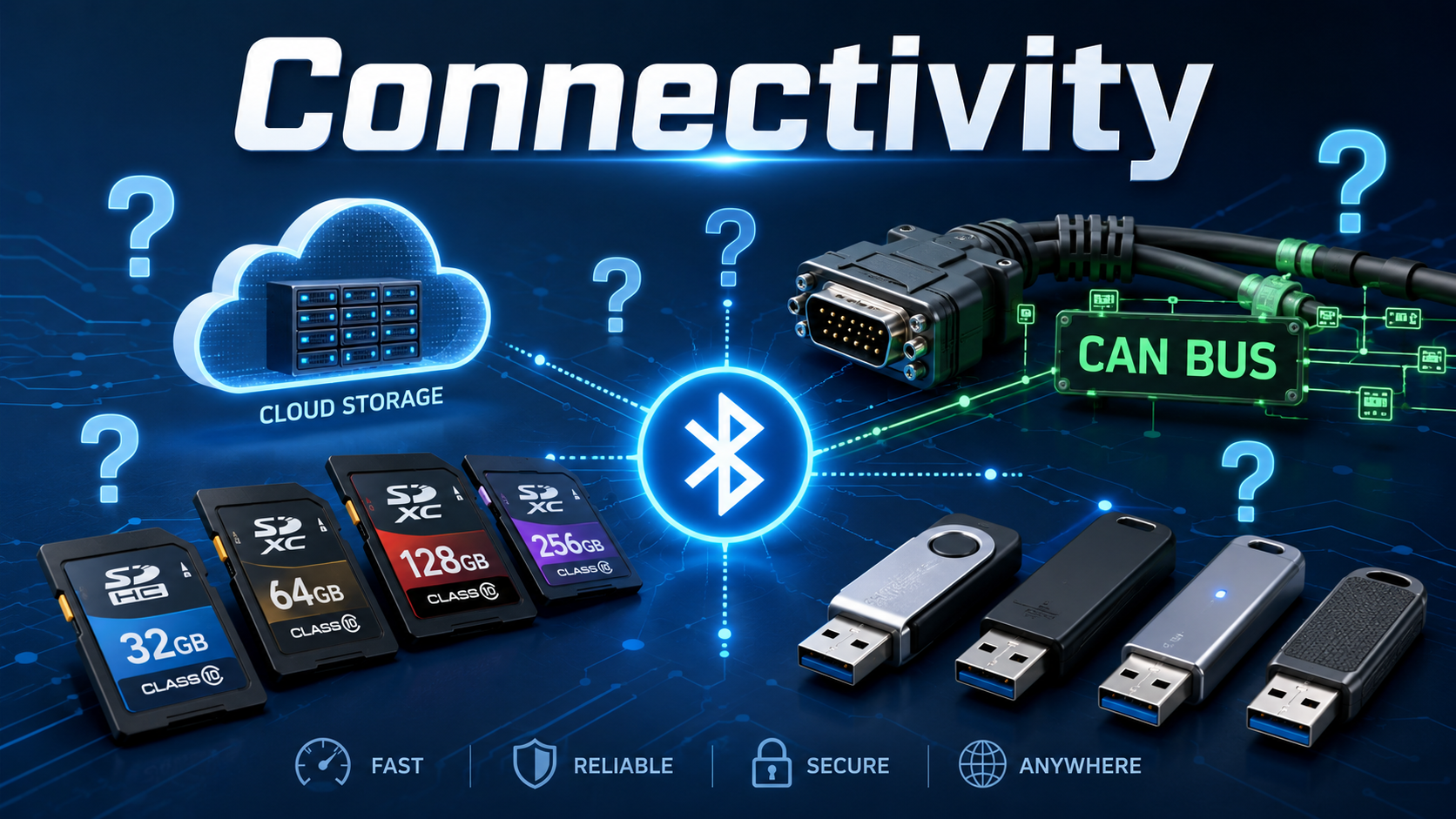
Connectivity and Data Strategy for Hardware Prototypes: From Local Logging to IoT and IIoT Systems
Putting Hardware Into Your Prototype: Part 5 of a Five-Part Series
In the first four articles in this series, we discussed using development boards in early hardware prototypes, choosing an appropriate control platform, selecting sensor packages, and packaging and powering electronics for realistic operation.
Once a prototype can sense, control, and operate in a practical physical form, another important question appears:
What will the device do with the information it collects?
A sensor-enabled prototype may simply need to record data during a controlled test. Another device may need to communicate with a mobile phone, report equipment status to a dashboard, operate across a factory network, send alerts from a remote location, or support a future connected product.
This is where terms such as IoT, or Internet of Things, and IIoT, or Industrial Internet of Things, often enter the conversation.
Connectivity can make a prototype far more useful. It can allow remote monitoring, automated data collection, field evaluation, equipment reporting, user notifications, fleet tracking, or collaboration between teams in different locations.
However, connectivity also introduces additional complexity.
A development board with Wi-Fi or Bluetooth does not automatically create a reliable connected product. A sensor that successfully uploads one measurement to a dashboard does not automatically establish a secure, scalable, or commercially supportable system.
A connected prototype should be designed around a practical purpose:
- What information needs to be collected?
- Who needs to access it?
- How quickly do they need it?
- Does the device need to work when the network is unavailable?
- Will data be stored locally, remotely, or both?
- Is the device only reporting information, or will it also accept commands?
- What level of reliability, security, and documentation does the intended use require?
The objective is not to connect a prototype simply because connection is possible. The objective is to create a data and communications strategy that helps determine whether the product concept is useful, practical, and worth developing further.
Not Every Smart Prototype Needs the Cloud
Connected-product discussions often begin with the assumption that all useful prototype data should be sent to the cloud.
That is not always necessary, and it is not always the best starting point.
A hardware prototype may provide significant value while operating entirely locally. For example, it may:
- Record sensor data to a memory card
- Save readings in onboard storage
- Display results directly on the device
- Send information to a nearby laptop
- Connect to a phone or tablet through Bluetooth
- Report to a local network dashboard
- Export a test file for later analysis
For an early feasibility prototype, these approaches may be faster, less expensive, and easier to evaluate than building a remote data platform.
A laboratory test device may only need to collect measurements during an experiment. A mechanical development prototype may need to compare force, pressure, or motion between two designs. An industrial test unit may need to collect vibration or temperature data over a shift and allow the team to retrieve the results afterward.
None of these applications automatically require a cloud platform.
Cloud reporting becomes valuable when the product requires capabilities such as:
- Monitoring devices from another location
- Comparing multiple units in the field
- Sending notifications or alarms
- Allowing several users to review information
- Tracking long-term trends
- Supporting service or maintenance decisions
- Offering a connected customer-facing product feature
The communications and data architecture should follow the actual use case, not a general assumption that every electronic product must immediately become an online service.
Begin With the Data Question
Before choosing Wi-Fi, cellular, Bluetooth, Ethernet, or cloud services, the project team should define what information the prototype is expected to produce.
A connected prototype may collect data for very different reasons:
- To prove that a mechanical concept works
- To compare multiple product designs
- To record operating behavior over time
- To identify a fault or maintenance concern
- To allow a remote user to monitor equipment
- To gather research data
- To provide alerts or notifications
- To support a future customer service
- To monitor a distributed group of devices or assets
These goals affect the amount of data collected, how frequently it must be sampled, where it must be stored, how quickly it must be transmitted, who needs access, and how reliable the communication must be.
For example, a prototype designed to confirm that a user correctly positions a handheld device may need to record orientation and contact data for a few minutes at a time. A field-installed equipment monitor may need to collect temperature and vibration information for months, report exceptional conditions, preserve records during network failures, and operate with minimal attention.
Both are sensor-enabled prototypes. Their data strategies are entirely different.
A useful development question is:
What decision will be made from the information this prototype produces?
If that decision is not clear, the project may be collecting data without a defined purpose.
Is the Device Reporting Data, Receiving Commands, or Both?
There is a meaningful difference between a device that reports information and one that can be controlled remotely.
A prototype that reports temperature, vibration, battery status, or usage information may be considered a monitoring device. A prototype that allows a remote user or software system to start a motor, open a valve, adjust a setting, reset equipment, or interrupt a process introduces additional risk and responsibility.
Reporting-Only Systems
A reporting system may:
- Upload sensor readings
- Send alerts when values exceed a threshold
- Record operating history
- Provide status information
- Support maintenance or evaluation decisions
If communication fails, the device may still continue its local function while storing information for later retrieval.
Remote-Controlled Systems
A remotely controlled system may:
- Change an operating parameter
- Turn an output on or off
- Activate an actuator
- Modify a machine state
- Acknowledge or suppress an alarm
- Update how the system behaves
These systems require careful planning around:
- User authorization
- Failure behavior
- Safe local operation
- Manual overrides
- Command confirmation
- Communication interruptions
- Cybersecurity
- Logging of actions
- Potential safety consequences
A development team should be very deliberate before adding remote control to a prototype. Remote reporting may answer the initial product question without taking on the complexity and risk of remote operation.
Local Storage, Remote Reporting, or Both?
One of the most practical decisions in a connected prototype is whether data should remain on the device, be transmitted elsewhere, or use both approaches.
| Data Strategy | Typical Use | Advantages | Important Considerations |
|---|---|---|---|
| On-device memory | Limited readings, operating settings, event counters | Simple and compact | Storage capacity and data retrieval |
| Memory card or removable storage | Test devices, field trials, research logging | Practical for larger data collection | Physical retrieval, file handling, data loss protection |
| Direct connection to computer | Laboratory or benchtop development | Easy debugging and immediate review | Not representative of standalone operation |
| Bluetooth to phone or tablet | Nearby user interaction or configuration | Avoids fixed network infrastructure | Requires compatible interface or application |
| Wi-Fi to local or cloud system | Indoor connected products and monitoring devices | Convenient where network exists | Network availability, setup, security |
| Ethernet connection | Fixed industrial, institutional, or building systems | Stable wired communications | Installation, cabling, physical routing |
| Cellular reporting | Remote equipment, mobile devices, distributed assets | Does not depend on local Wi-Fi | Coverage, power, service cost, antenna placement |
| Local storage plus periodic upload | Field, industrial, or unreliable-network applications | Retains records during outages | Synchronization and additional software effort |
For many practical prototypes, local storage plus later retrieval is sufficient during early testing. Once the product has demonstrated useful measurement capability, remote communications may be added to determine whether connected operation creates enough value to justify the added complexity.
In more demanding applications, using both local storage and remote reporting may be the appropriate strategy. A remote monitoring device should not necessarily lose all information simply because the network is interrupted.
Choosing the Right Communication Method
The communication method should reflect the physical environment, data needs, distance, power budget, and expected user experience.
There is no universally best option.
Bluetooth: Nearby Interaction and Configuration
Bluetooth can be useful when a device needs to communicate with a nearby phone, tablet, computer, or local accessory.
Typical uses include:
- Initial device setup
- Reading recent measurements
- Adjusting user settings
- Connecting to a mobile application
- Interacting with a portable or wearable device
- Retrieving data without opening the enclosure
Bluetooth may be appropriate when the user is expected to be physically near the device. It can reduce the need for a fixed network connection and may be practical for battery-powered products.
However, Bluetooth also raises questions:
- Will the prototype require a mobile application?
- How will devices be paired or identified?
- Will the user expect continuous communication or occasional synchronization?
- What happens if the phone is not present?
- Does the device still need local storage?
A Bluetooth-enabled product is not automatically simple merely because the radio is built into the development board.
Wi-Fi: Convenient Connectivity Where Networks Are Available
Wi-Fi is often an attractive choice for indoor connected prototypes because it can allow data transmission through an existing network.
Possible applications include:
- Indoor environmental monitoring
- Laboratory equipment
- Smart-building devices
- Connected appliances
- Office or facility monitoring
- Fixed customer-facing devices
- Early cloud-connected demonstrations
Wi-Fi may work well when the product is used in a known setting with reliable network access and available power.
Questions to address include:
- How will the device be configured for a network?
- Will the product be moved between locations?
- What happens if the network password changes?
- Can the product operate when Wi-Fi is unavailable?
- Is the network appropriate for the data being transmitted?
- Will wireless performance be affected by the enclosure, equipment, or building environment?
- Is the device battery powered, and if so, is wireless operation practical?
Wi-Fi is a useful development tool and a viable product communication method in many applications. It should still be evaluated against realistic operating conditions.
Ethernet: Stable Wired Connectivity for Fixed Systems
Ethernet can be a practical choice for devices that will remain in a fixed location, particularly in industrial, institutional, laboratory, or building-monitoring environments.
Compared with wireless communication, a wired Ethernet connection may provide:
- More predictable communication
- Reduced dependence on wireless signal strength
- Easier integration into certain fixed systems
- Practical use in equipment rooms or facility installations
Ethernet may be appropriate for:
- Fixed monitoring stations
- Laboratory systems
- Equipment cabinets
- Industrial work areas
- Building-control applications
- Local dashboards or network-connected instruments
The tradeoff is that the installation requires cabling, physical network access, connector protection, and coordination with the location where the prototype will be installed.
For a fixed system, those tradeoffs may be preferable to relying on wireless communication.
Cellular: Remote Equipment and Field-Deployed Devices
Some prototypes must operate where no reliable local network is available.
Examples may include:
- Agricultural monitoring
- Remote equipment
- Distributed industrial assets
- Mobile systems
- Temporary field installations
- Outdoor environmental monitoring
- Asset-location or equipment-status products
In these cases, cellular communication may provide a path for remote reporting.
Cellular capability can be extremely valuable, but it introduces additional design and business considerations:
- Cellular coverage in the intended region
- Antenna location and enclosure effects
- Ongoing service or platform costs
- Power consumption
- Data-usage planning
- Device activation and management
- Local storage during signal loss
- Remote updates and long-term support
A successful cellular-connected prototype must demonstrate more than one data transmission. It should help determine whether the device can operate reliably and economically in the conditions where it is intended to be used.
USB and Serial Connections: Simple, Useful, and Often Underestimated
Not every useful prototype needs wireless communication.
A USB or serial connection can be highly appropriate for:
- Laboratory instruments
- Setup and calibration
- Engineering evaluation
- Service tools
- Direct computer logging
- Firmware updates
- Configuration of a local device
- Controlled testing in a development environment
For products that will only be used by trained personnel in a controlled location, a straightforward wired data connection may be entirely appropriate.
It is easy to assume that wireless communication makes a product more advanced. In some settings, a wired interface may make it more dependable, easier to support, and less expensive to develop.
Industrial Communication: RS-485, Modbus, CAN Bus, and Existing Equipment
Industrial and mobile-equipment prototypes often need to communicate differently from consumer smart devices.
A factory, vehicle, machine, robotic platform, or field-installed system may already use established communication methods. A useful prototype may need to interact with those systems rather than introducing a separate consumer-style wireless connection.
RS-485 and Modbus
RS-485 and Modbus are commonly encountered in industrial sensors, process equipment, building systems, and longer-distance wired installations.
They may be appropriate when:
- Sensors are located farther from the controller
- The environment is electrically noisy
- Existing industrial devices already provide compatible outputs
- Wiring needs to be durable and practical for field installation
- Several devices need to communicate along a shared wired network
CAN Bus
CAN bus is commonly associated with vehicles, mobile equipment, robotics, machinery, and distributed control systems.
It may be appropriate when:
- A prototype interfaces with vehicle or equipment systems
- Several electronic nodes need dependable communications
- The operating environment involves vibration or electrical noise
- Machinery or robotic systems already use compatible networks
Existing Customer Systems
For industrial prototypes, the communication method may be determined less by the development board and more by the system into which the product must be installed.
A prototype may need to communicate with:
- Existing machinery
- Programmable logic controllers
- Industrial sensors
- Data-acquisition systems
- Facility networks
- Maintenance dashboards
- Control cabinets
- Equipment already specified by the customer
This is why industrial connectivity should be considered early. Demonstrating data over a convenient bench connection may not be enough if the intended product must later operate within an existing equipment environment.
IoT and IIoT Are Related, but Not Identical
The Internet of Things broadly refers to connected devices that collect information, communicate, or interact with users and systems.
The Industrial Internet of Things applies similar capabilities in manufacturing, infrastructure, equipment, facilities, field operations, and other industrial environments.
Both may involve sensors, controllers, communications, dashboards, and stored data. Their practical requirements can differ significantly.
| Consumer or General IoT Prototype | Industrial IoT Prototype |
|---|---|
| Often focused on user convenience or product features | Often focused on equipment condition, operation, maintenance, or process information |
| Wi-Fi or Bluetooth may be sufficient | Ethernet, cellular, RS-485, Modbus, CAN bus, or industrial networks may be required |
| Operates in homes, offices, or consumer settings | Operates in factories, shops, fleets, facilities, or outdoor sites |
| Temporary communication failure may inconvenience the user | Communication failure may interrupt monitoring, maintenance planning, or operations |
| Appearance and simple setup may be primary concerns | Reliability, wiring, mounting, service access, and system integration may be central |
| Product replacement may be common | Long-term maintenance and support may matter substantially |
An industrially connected prototype should be designed with its environment in mind.
It may need durable connectors, realistic mounting, local data retention, clearly defined failure behavior, technician access, compatibility with existing equipment, and a plan for operating during network loss.
A shop-floor or field-installed prototype that only works under ideal office-network conditions may not be demonstrating the system that the customer actually needs.
What Happens When Connectivity Fails?
A connected prototype should not assume uninterrupted communication.
Networks fail. Wireless signals weaken. Cellular coverage varies. Passwords change. Cables are disconnected. Routers restart. Batteries become depleted. Devices move outside their intended coverage area.
The development team should determine what the device must do when communication is unavailable.
Questions include:
- Can the device still perform its primary local function?
- Will it save data until the connection returns?
- How much data must it be able to store?
- Will it retry communication automatically?
- Does the user need a visible or audible warning?
- Does loss of connection create a safety or equipment-control concern?
- Can the device recover after power loss or reset?
- Does it require a manual override?
- Can the system distinguish between no data and a valid zero reading?
For many systems, the correct approach is that the device continues to operate locally and preserves important measurements until communication is restored.
For other systems, communication may be central to the product purpose, and loss of connection should create an alert or controlled response.
A useful principle is:
A prototype that only functions while connected to a perfect network may be demonstrating network availability rather than demonstrating a reliable product.
Offline behavior is not an advanced production concern only. It can be a fundamental part of determining whether the product concept is viable.
Data Quality Still Matters After the Sensor Produces a Reading
Adding communications does not improve the quality of a poor measurement. It only moves the poor measurement somewhere else more efficiently.
A connected prototype still needs to determine:
- Whether the sensor is measuring the intended condition
- Whether the reading is sufficiently repeatable
- Whether timestamps are accurate enough for the intended analysis
- Whether data has been lost or interrupted
- Whether the measurement unit and calibration are understood
- Whether data from multiple devices can reasonably be compared
- Whether the information shown on a dashboard is raw, filtered, calculated, or interpreted
This becomes especially important when the prototype supports:
- Research evaluation
- Industrial equipment decisions
- Maintenance recommendations
- Medical-development work
- Customer-facing reports
- Performance claims
- Safety-related monitoring
A clear data strategy should define not only how information is transmitted, but what that information means.
Local Dashboards and Cloud Dashboards
Dashboards can make a prototype compelling because they allow sensor readings, device states, alerts, or long-term trends to be seen in a useful form.
A dashboard may display:
- Current sensor values
- Historical measurements
- Battery condition
- Connection status
- Alarm events
- Operating cycles
- Comparative test results
- Equipment status
- User activity, where appropriate
During prototype development, a simple dashboard may be very valuable. It can help the team determine whether the available data is understandable and whether it supports the expected decision.
However, it is important to distinguish between a prototype dashboard and a complete commercial software platform.
A demonstration dashboard may show that sensor data can be transmitted and displayed.
A commercial connected product may eventually require:
- User authentication
- Access permissions
- Data protection
- Device enrollment
- Remote software updates
- Customer account management
- Notifications
- Long-term hosting
- Backups
- Maintenance
- Usage tracking
- Fleet management
- Technical support
- Documentation and version control
These are not minor additions. They can represent a significant portion of the product-development effort.
A prototype project should therefore define whether the dashboard is intended to demonstrate functionality, support internal testing, enable a controlled pilot, or become the beginning of a supported customer-facing software product.
Security, Privacy, and Data Ownership
As soon as a device stores or transmits data, the development team should consider who owns that information, who can access it, and what may be exposed if the system is not adequately protected.
Not every prototype handles sensitive data. However, connected systems may reveal more than expected.
A device may collect information about:
- User behavior
- A customer’s equipment
- Production activity
- Facility operations
- Location
- Research results
- Device usage
- Maintenance conditions
- Commercially valuable operating patterns
The team should ask:
- Who owns the collected data?
- Who is authorized to view it?
- Is the data stored locally, remotely, or by a third-party platform?
- Does the device transmit identifying or sensitive information?
- Does the communication system permit reporting only, or also remote control?
- How are credentials or access methods managed?
- What happens when a prototype is transferred to a customer or research partner?
- Will cybersecurity, privacy, contractual, or regulatory requirements become important later?
The objective in an early prototype is not necessarily to solve every future cybersecurity and compliance requirement. The objective is to identify whether connectivity introduces product obligations that will materially affect the development path.
A connected prototype should not accidentally create a data-handling problem that the project team never planned to manage.
Choosing Connectivity According to Prototype Phase
Not every communication feature belongs in the first version of a prototype.
A phased approach allows the project to determine whether the product creates useful information before adding the cost and complexity of remote systems.
Phase 1: Local Functional Testing
The earliest prototype may operate without external connectivity.
Typical goals include:
- Confirming sensors operate
- Confirming outputs respond
- Viewing readings through a direct computer connection
- Testing basic control behavior
- Determining whether the core measurement or mechanical function is useful
At this stage, local display, USB communication, or simple logging may be sufficient.
Phase 2: Reliable Data Collection
Once the basic function is proven, add a structured method for recording results.
Typical goals include:
- Saving readings locally
- Recording timestamps
- Comparing tests
- Identifying repeatable behavior
- Determining what information matters
- Building a basic data-review method
At this stage, the team should learn whether the data supports a real decision.
Phase 3: Appropriate Connectivity
Once useful data has been identified, add the communication method appropriate to the intended use.
This might include:
- Bluetooth interaction with a nearby user
- Wi-Fi reporting from an indoor device
- Ethernet in a fixed installation
- Cellular reporting from a remote asset
- Industrial communications for equipment integration
- Local storage with periodic synchronization
The objective is to determine whether connected operation creates practical value.
Phase 4: Representative Connected Prototype
At this stage, the system should begin addressing realistic operation.
Typical goals include:
- Testing in the intended environment
- Evaluating communication reliability
- Verifying local operation during connection loss
- Reviewing power consumption during transmission
- Evaluating data display or dashboard usefulness
- Determining service and support needs
- Identifying cybersecurity and ownership concerns
Phase 5: Planning a Supported Product
Once the connected prototype has produced useful evidence, the team can evaluate what would be required for a commercially supported product.
This may include:
- Dedicated electronics
- Production sensor integration
- Final communications hardware
- Device provisioning
- Software update strategy
- Data hosting
- Access control
- Security testing
- Customer support
- Maintenance responsibilities
- Compliance and documentation needs
This staged approach keeps early development achievable while still building toward a realistic connected product architecture.
A Connected Prototype Should Support a Business or Engineering Decision
Connectivity is not the objective by itself.
The objective is to create a device that gathers and communicates information in a way that has practical value.
A connected prototype may help answer questions such as:
- Can a device monitor a condition remotely?
- Can a product detect a useful operating event?
- Can an equipment owner receive meaningful maintenance information?
- Can a research team collect consistent data from repeated tests?
- Can a mobile product synchronize information with a user interface?
- Can a field-deployed system operate without local network infrastructure?
- Can an industrial sensor system work within the customer’s existing environment?
- Does the connected feature create enough value to justify the added product complexity?
The project should define what a successful result looks like before building a large connected architecture.
A prototype that sends large amounts of poorly understood data is not necessarily more valuable than one that stores a single well-defined measurement locally.
The correct connectivity strategy is the one that makes the product easier to evaluate, operate, maintain, and eventually justify.
Closing the Series: From Electronic Concept to Practical Product Prototype
Across this five-part series, we have discussed the major early decisions involved in putting electronics into a hardware prototype.
Part 1: Using Development Boards in Early Hardware Prototypes
Development boards can reduce risk by allowing a team to test product functions before investing in custom electronics.
Part 2: Choosing the Right Development Board
Microcontrollers, small computers, industrial controllers, cellular platforms, and edge-computing systems serve different purposes. The correct platform depends on what the prototype must accomplish.
Part 3: Choosing Sensor Packages
Sensors create value only when they measure the correct condition with enough reliability to support a development decision.
Part 4: Powering and Packaging Hardware Prototypes
A bench-functional circuit becomes much more meaningful when it can be powered, packaged, handled, mounted, and tested in a realistic operating environment.
Part 5: Connectivity and Data Strategy
A connected prototype becomes valuable when it collects, stores, communicates, and presents information in a way that supports an engineering, operational, research, or business decision.
Together, these considerations create a practical path from an idea to a functional electronic prototype:
Define the problem. Select an appropriate control platform. Measure what matters. Package and power the system realistically. Connect it only where connectivity creates value.
The next step for a successful prototype may be further testing, a pilot deployment, mechanical refinement, production-oriented electronics, dedicated printed circuit boards, software development, compliance planning, or manufacturing preparation.
Those later stages deserve deliberate planning of their own.
JaegerTech Can Help Build Practical Connected Hardware Prototypes
At Jaeger Technology Group, we help customers move hardware concepts toward functional, testable prototypes that produce useful information.
That work may include:
- Development-board integration
- Sensor selection and packaging
- 3D-printed housings, brackets, and fixtures
- Power and electronics packaging considerations
- Local data-logging systems
- Connected sensor prototypes
- Industrial monitoring feasibility systems
- Bluetooth, Wi-Fi, wired, or remote-reporting prototype strategies
- Test assemblies and evaluation hardware
- Planning for later product integration and manufacturing
Whether a project requires a basic data-logging proof of concept, a sensor-enabled research device, an industrial monitoring prototype, or an early connected-product demonstration, the goal is the same:
Build a practical system, collect information that matters, and make the next product-development decision with greater confidence.
About the Author: jaegertechgroup.com

STAY IN THE LOOP
Subscribe to our free newsletter.
Leave A Comment

From 3D Scan to Perfect Fit: The Corvette Bumper Project Moves Forward A few weeks ago, we shared a project that demonstrated

Custom 3D Printed Speaker Pods for a 2005 Ford Mustang Sometimes the problem is not the speaker. It is everything around it.
Still Using Cura or Simplify3D? JaegerTech Can Help Build an OrcaSlicer Profile for Your 3D Printer A 3D printer does not become
When the Manufacturer Disappears: Support for Orphaned 3D Printers Industrial 3D printers are often purchased with the expectation that they will remain